Change plan
How to check your current plan and switch to a higher or lower plan from the admin panel.
2026-09-25
Before you start
- You need the Director role to access account settings.
- If your school is on a custom (white-label) plan, plan changes are handled directly by Lyncat. Reach out at suport@lyn.cat.
- Some schools are billed outside the platform (by bank transfer or directly with Lyncat). In those schools the Plan tab shows no management button: plan changes are also arranged with us.
Step by step
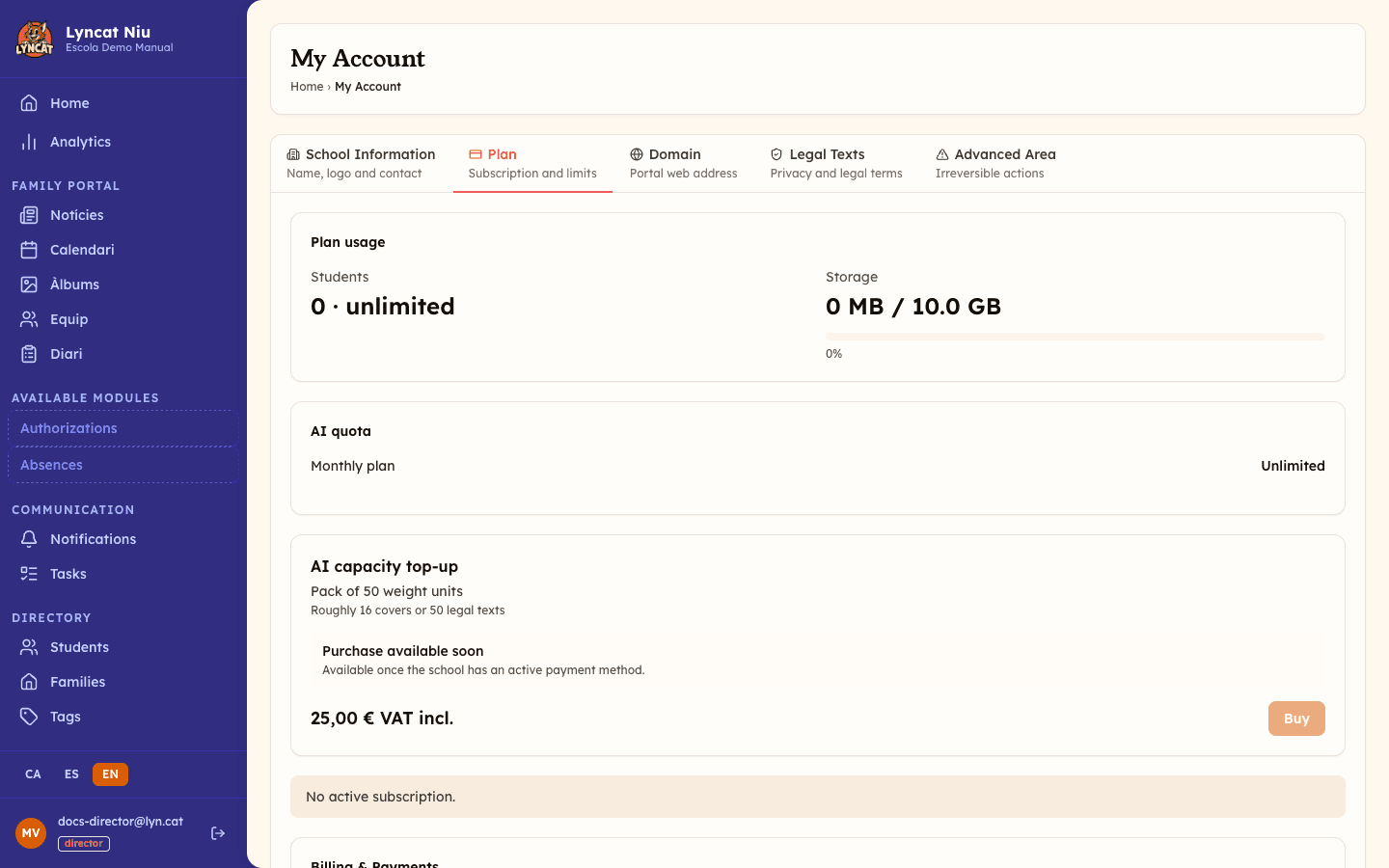
Go to My account → Plan
In the sidebar, click My account. On the page that opens, select the Plan tab.
You will see your current usage (students and storage), the subscription status, and the button to manage it.
Click the management button
The button shown depends on your subscription status:
- "Activate plan" — you are on a free trial or the trial has expired. Click to choose a plan and enter your payment details.
- "Manage subscription" — you already have an active plan. Click to open the billing portal, where you can switch plans, update your payment method, or cancel.
- "Update payment method" — there is a pending payment. Click to resolve it and restore full access.
- "Reactivate subscription" — the subscription was cancelled. Click to reactivate it.
Make the change in the billing portal
The panel takes you to the portal in the same tab, so you leave Niu while you are there. You can select a different plan (higher or lower) and see the prorated price breakdown if you switch mid-billing-cycle. Confirm the change with one click.
Once done, the portal sends you back to the panel. Your plan status will update automatically.
Truc
If you are approaching your student or storage limit, you will see the progress bar near the maximum in the Plan tab. Switch plans before the school gets blocked from adding new entries.
Plan comparison
| Feature | Llavor | Brot | Arrel |
|---|---|---|---|
| Price (/month + VAT) | €49.95 | €79.95 | €99.95 |
| Students | Up to 60 | Up to 150 | Unlimited |
| Storage | 5 GB | 15 GB | 40 GB |
| AI tasks / month | ~3 | ~15 | ~60 |
| Authorizations and questionnaires | Yes | Yes | Yes |
| Messaging with families | — | Yes | Yes |
| Handwritten signature | — | Yes | Yes |
| Family observations | — | Yes | Yes |
| Internal team messaging | — | — | Yes |
| Analytics | — | Basic | Advanced |
| Custom domain | — | Yes | Yes |
What to do if...
I don't see any management button
There are two cases where the Plan tab shows no Billing & Payments block:
- Your school is on a custom (white-label) plan: Lyncat manages it directly.
- Your school is billed outside the platform. In that case, instead of the subscription status you will see a Billing up to date banner (or You have overdue invoices if one is still unpaid past its due date) and, below it, your invoices with a downloadable PDF.
In both cases, contact us at suport@lyn.cat to change plan.
The billing portal is slow or doesn't finish loading
The portal does not open in a pop-up window: the panel navigates straight to it, so pop-up blockers are not involved. If the page stalls, go back in your browser and click the button again in a couple of minutes.
I see an error saying the billing portal could not be accessed
Reload the page and click the button again. If the message persists, contact us at suport@lyn.cat.
Frequently asked questions
Is the plan change immediate? When upgrading, new features and limits are activated immediately. When downgrading, the change takes effect at the end of the current billing cycle.
Will I lose data if I downgrade? No. If your student count or storage exceeds the new plan's limits, adding new students or files is simply blocked until you reduce usage or upgrade again. If you downgrade below the plan that includes messaging with families, internal team messaging, or family observations, anything you already had is kept and stays viewable; only creating new content of that type is blocked until you upgrade again. Authorizations that required a signature stop requiring one, but signatures already collected are kept.
How do I know which plan I'm on? In the Plan tab of your account, under Plan details, you can see your current plan, the monthly price and the next billing date. If your school is billed outside the platform, you will see the price agreed with Lyncat and no next billing date.
Can I cancel my subscription? Yes, from the billing portal. The subscription stays active until the end of the already-paid billing cycle.
Do I need the Arrel plan to have a custom domain? No, custom domain is already available from the Brot plan. Once on Brot or Arrel, configure it from My account → Domain.