
My profile
Manage your name, avatar and personal details from the panel's user menu.
2026-09-20
Before you start
- This page is for every member of staff: directors and educators. Each person manages only their own profile, not anyone else's.
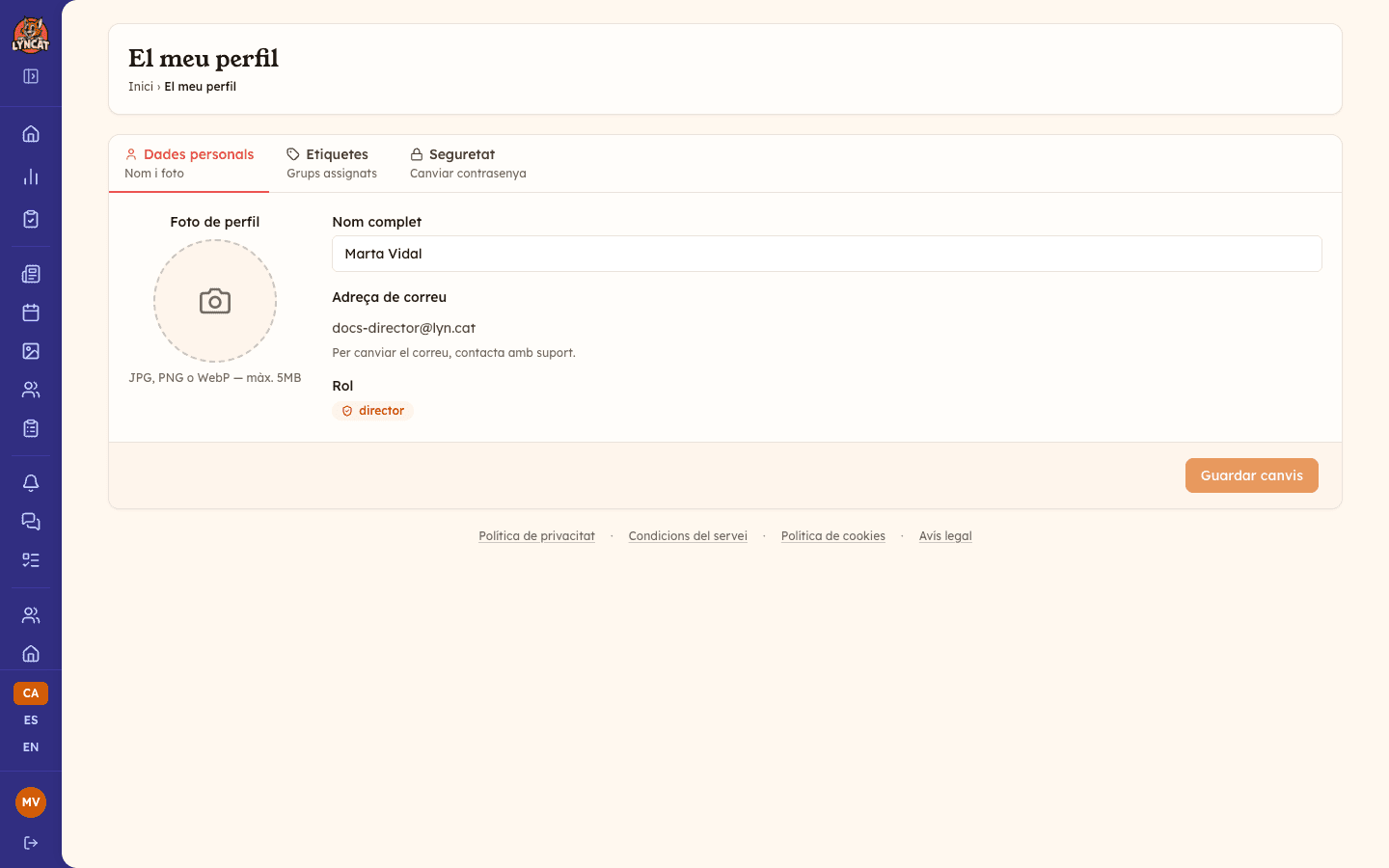
- Your email address cannot be changed from here. If you need to update it, contact support.
Step by step
Open your profile
At the bottom of the sidebar, click your avatar (or your initials, if you haven't uploaded a photo yet). This opens the My profile page.
Update your personal data
On the Personal Data tab, you can change your full name and upload a profile photo (JPG, PNG or WebP, up to 5 MB). Your email address and your role are shown for reference only: they can't be edited from here.
Click Save Changes when you're done. Once the change is applied, the footer of the form shows Saved. If you have edited something and want to undo it before saving, use the Cancel button next to it.
Review your tags (if any)
If your school already has tags set up, you'll see a Tags tab. From there you can choose which tags you're assigned to: they determine, for example, which groups of children you see in the daily report.
Click Add tags (or Manage tags, if you already have some) and a window opens with all the school's tags, grouped by school year and with a search box in case there are many. Tick the ones that apply to you, click Done to close the window, then Save Changes to confirm.
Change your password
On the Security tab, enter a new password (minimum 8 characters) and type it again in Confirm Password. Click Change Password to apply the change.
Truc
If you're an educator and don't see the Tags tab, that's expected: it only appears once the school has tags set up. Talk to the school's director if you think you should be assigned to one.
What to do if...
I changed my password and can't log back in
Make sure the new password has at least 8 characters and that you typed it the same way in both fields. If you still can't log in, use the Forgot your password? link on the sign-in screen: you'll get an email to set a new one (the link expires after one hour).
I uploaded the wrong profile photo
Go back to the Personal Data tab and upload another one: the new photo replaces the previous one. Supported formats are JPG, PNG and WebP, up to 5 MB.
It says there isn't enough storage space when I upload the photo
Your avatar uses the school's storage, just like photos and documents. If the school has reached its plan limit, saving opens the Not enough storage space window showing how much your plan includes and how much you've used, and the photo isn't uploaded. Free up space (for example, by deleting old albums) or talk to the school's director about upgrading the plan.
I need to change my email address
This can't be done from this page. Contact support and they'll help you update it.
Frequently asked questions
Can I view or edit another staff member's profile? No. Each person can only manage their own profile. To manage other staff members (add them, edit their role, or deactivate accounts), the school's director does that from Settings → Educators.
Why can't I change my role from here? Your role (director or educator) is shown for reference only. Only a director can change it, from Settings → Educators.
Do the tags I choose affect what I see in the panel? Yes. If you're an educator, your assigned tags determine, for example, which children you see in the daily report or in attendance.