
Educators
Invite new educators or directors to your school, manage their access and assign group tags.
2026-09-05
Before you start
- You need the director role to access this section. If you have the educator role, the system will redirect you to the dashboard.
- Each team member needs their own account to access the panel. The invitation is sent to their email address.
Truc
If you want to assign tags to an educator (for example, their classroom or group), they must first accept the invitation and register. You can then assign tags from the edit modal.
Step by step
Invite a new educator
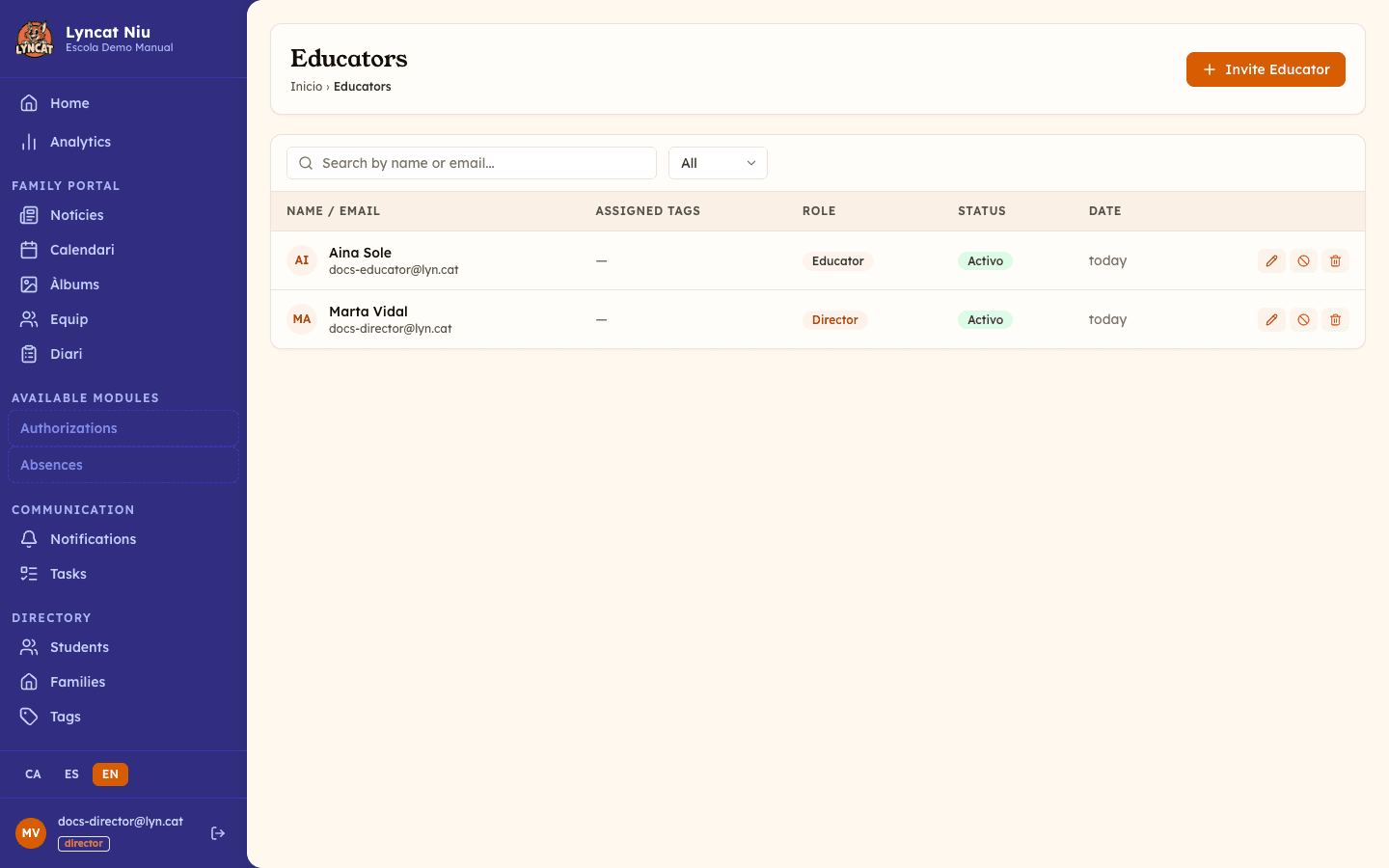
Open the Educators section
In the side menu, go to Settings → Educators. The list combines team members and invitations that have not been accepted yet in a single table, with the columns Name / Email, Assigned Tags, Role, Status and Date.
Click Invite Educator
In the top-right corner, click the Invite Educator button.
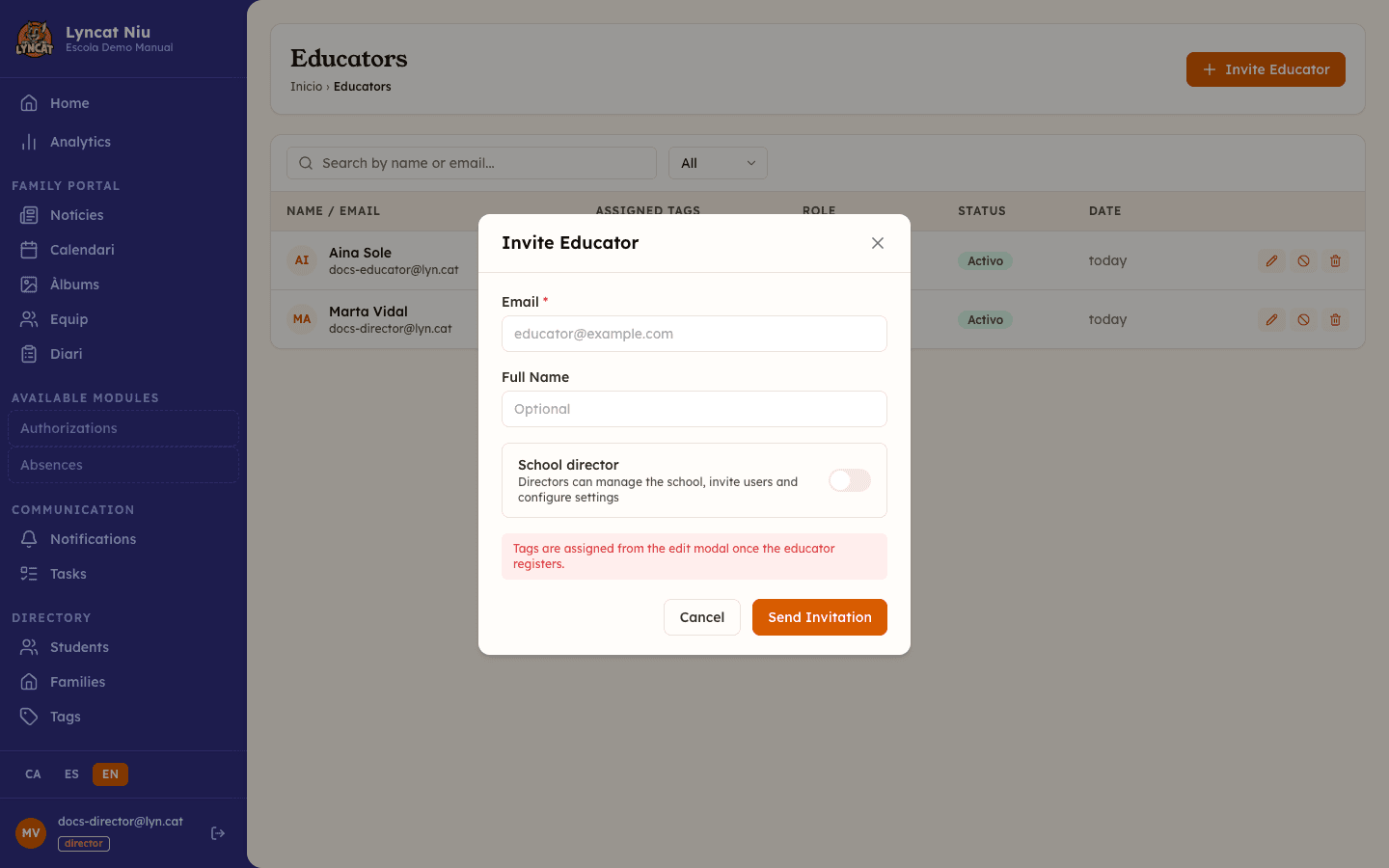
Fill in the invitation details
Enter the Email of the person you want to add. The Full name field is optional: if you leave it blank, the person can fill it in when they accept the invitation.
If you want them to have School director access (can manage the school, invite users, and configure settings), enable the corresponding toggle.
Send the invitation
Click Send invitation. The person will receive an email with a link to accept it. Until they accept, they will appear in the list with the status Pending.
Edit an educator
From the list, click the pencil icon to open the edit modal. You can change:
- Full name — the name shown in the panel.
- Assigned tags — select the group or classroom tags that apply to them.
- Active account — if you deactivate it, the educator cannot access the application but their data is preserved.
- School director — you can promote or revoke the director role.
Click Save changes to save.
Activate or deactivate an educator
You can activate or deactivate an account without deleting it. From the list, click the ban icon (⊘) to deactivate, or the check icon (✓) to reactivate.
Avís
Be careful if you are the school's only active director: deactivating that account (yours or another director's) would leave nobody with admin access, and the system does not prevent it. Make sure there is always at least one other active director before deactivating one.
Delete an educator
The trash icon permanently deletes the educator. This action is irreversible and removes all their data.
Avís
Deleting an educator is permanent. If you only want to temporarily block access, use deactivation instead.
Manage invitations
Invitations appear in the list as another row, with the status Pending or Expired. The available actions depend on the status:
- While the invitation is Pending, the envelope icon (Resend Invitation) sends the email again and renews the 7-day window.
- Once the invitation is Expired, that icon is no longer shown. The only remaining action is the bin.
- The bin (Delete) removes the invitation from the list if you no longer want to add that person.
Filter the list
The page includes two filtering tools:
- Search by name or email — type part of the name or email address.
- Filter by status — show all, active, pending, or inactive.
What to do if...
I don't see the "Invite Educator" button
You must be signed in with an account that has the director role. Educators cannot manage other team members.
The invitation has expired
Expired invitations cannot be resent: the envelope icon only appears while the status is Pending. Filter by All to find the expired row, delete it with the bin icon, and invite the same address again with Invite Educator. The person will receive a new link, valid for 7 days.
The invited person already has a Niu account
The same email can have an account at more than one school (for example, someone who works at several schools). If you invite an address that already has an account, the person does not create a new password: when they open the invitation link, they sign in with the password they already use and the system links the invitation to their account.
The educator cannot access the panel
Check that their account appears as Active in the list. If the status is Inactive, click the reactivation icon.
I can't revoke the director role
If the educator is the only active director at the school, the system will block the change. Add another director before modifying their role.
Frequently asked questions
What is the difference between a director and an educator? A director can manage the school: invite users, configure settings, and access all administration sections. An educator has limited access: they can view data and record daily reports, but cannot modify school settings.
Can I have more than one director? Yes. You can assign the director role to as many team members as you need.
Are tags assigned during the invitation? No. Tags (classroom, group, year) are assigned from the edit modal once the educator has accepted the invitation and registered in the system.
If I delete an educator, is the data they created lost? The data they created (daily reports, news, etc.) is preserved in the system. What is deleted is their account and access.